Who is ME ?

Me is Goh Wah Thye, Zack. I graduated from Curtin University with Bachelor of Arts (Design). I used to work in an advertising agency and as a freelancer before i decided to continue with my Master Degree at Multimedia University. I am into travel, IT gadgets, pets and photography. I studied Photography during my college time, but had stopped pursuing this passion after graduation. However, I recently picked up this passion again after purchasing my first DSLR camera (bear in mind, im using SLR camera in my college). I always make it a point to practise my photography whenever i indulge in my other hobbies such as travelling or walking my dog. Whether with a camera or mobile phone, I never miss a chance to take the best shoot surrounding me.

Who is MAX ?

Max is my lovely companion dog. He is a Bernese Mountain Dog. It is a rare breed in Malaysia.He is huge and stocky weighing about 45 kgs. Many people who not familiar with this breed thought he is fierce because of his huge size. But really he as friendly as Border Collie and as smart and active as Golden Retriver. Max got his own habits when no one is at home to entertain him. He likes to Day Dream!

Content

Theme 2 :: MAX AND HIS YEARNED FOR COURAGEOUSNESS

Thursday, March 24, 2011 1 comments


:: MAX AND HIS YEARNED FOR COURAGEOUSNESS ::

The warm and dark concept signify his scary and worried feeling. The old and abandoned site showing his feeling being forsaken and lonely. From his flying action in the picture, he wish to be free and spread away from the depression. Beside that, he wish himself to be an unicorn which is brave yet friendly and beautiful. It also fight many obstacles and at same time can be friendly to all his family and friends.

Theme 2 :: IDEA

0 comments


I got the inspiration for this theme because Max is scared of the sound of thunder and fireworks. While everyone was happy celebrating this festive season, this was the time he hated most. When people played fire crackers and fireworks everyday during the festive season, he needed to hide under the table at the dark corner in his room. I wonder what was in his mind? Perhaps he imagined himself as an unicorn brave and courageous enough to go out and happily celebrate the festival with everyone.

Theme 1 :: MAX AND HIS GLUTTONY FANTASY

1 comments


:: MAX AND HIS GLUTTONY FANTASY ::

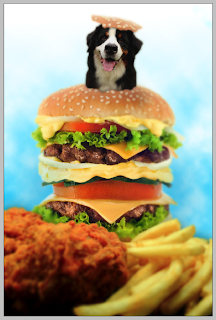
This picture showing Max and his fun time smelling and eating fast food. It also represent the colourful hamburger to emulate his happiness. He hope in his heart to try tasty and edible food especially those food that humans usually eat. His expression with his wet tongue showing that he can not wait to taste this food. The big hamburger symbolize that he want extra, gigantic ones than a normal burger. Dogs as you would expect born to be greedy and uncomplicated eaters. Max can do any tricks in order to get good food as an incentive.

Theme 1 :: TUTORIAL

Monday, March 14, 2011 3 comments
Max and his Gluttony Fantasy :: Tutorial

Before edit the pic with Adobe Photoshop (PS), get ready few photographs according to our sketching.
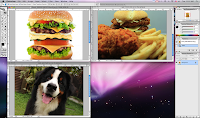


1 • Use [Magic Wand Tool (W)] and select the white background. PS will auto select the white background.
2 • Go to SELECT > INVERSE. PS will select the burger.
3 • After select the burger, go SELECT > FEATHER (use feather effect for more natural effect to the object). Minimize and keep this photo one side, and continue with other photos.
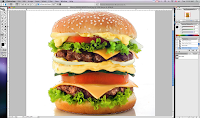


4 • Same steps for the next photo but the photo is not white background. Then use [Magnetic Lasso Tool (L)] and select which area that we want for our project.
5 • After select the object that we want, go to SELECT > FEATHER.
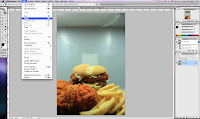


6 • Go EDIT > COPY > EDIT > PASTE to create a new layer for the object.
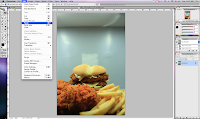


7 • Open the first photo and drag the selection object into the 2nd photo. It will create another layer for the object. Minimize and keep it one side.
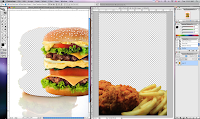


8 • Go EDIT > FREE TRANSFORM to rotate the photo.
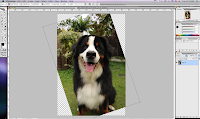


9 • The dog is fluffy and hairy. Use [Eraser Tool (E)] with hardness 0% to create an outline for the dog.
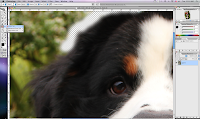


10 • This is the easiest way to maintain the fluffiness of the dog and looks more natural.
11 • After that, select the dog with [Lasso Tool (L)] and draw around the erased area. PS will select the dog.
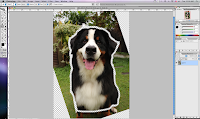


12 • Drag the selection image to the previous photo and you will see all the 3 photos in the same file but different layers.
13 • Edit the object size with EDIT > FREE TRANSFORM
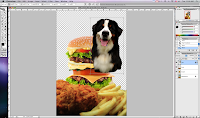


14 • For the hat of the dog, select Burger Layer and use [Lasso Tool (L)] to draw the shape of the hat.
15 • EDIT > CUT > EDIT > PASTE will create another layer for the hat. (Not advice to Paste it to the same layer because it will be troublesome if edit the hat or burger later.)
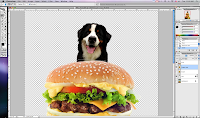


16 • Create a new layer for the background. Change the foreground color to Blue, and remain the background color as White.
17 • Go FILTER > RENDER > CLOUDS for the cloud effect.
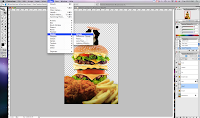


18 • The clouds is too stiff and not natural. Create another new layer and apply [GRADIENT (G)] to the new layer.
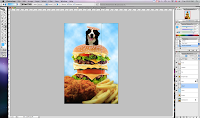


19 • At the Layer window. Select the Gradient Layer and change it to OVERLAY.
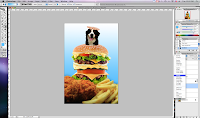


20 • To create dreaming effect. Save the entire project to another file name.
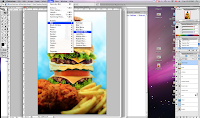


21 • Merge all the layers to be one complete photo. Go FILTER > BLUR > GAUSSIAN BLUR and adjust the radius level.
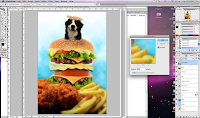


22 • Drag the new blur layer into existing layers file and place it on top of all layers.
23 • Use [ERASE TOOL (E)] with 0% hardness and 50% flow to erase the blur layer, so the other layers at the back will appear.


TIPS :

i • Adobe Photoshop only allow one step UNDO from the shortcut key (COMMAND + Z). Allow to check and undo from the History window but up to 20 steps.
ii • Always duplicate another layer if not sure with the PS effect. At least a back up layer still around if not satisfy with the effects and colors.

Theme 1 :: IDEA

0 comments


Max like to eat, especially human food. He always show his pity face and watery eye when I not allow him to eat it. So he will mad and lay down at one side of the house and start his day dreaming. I not sure what is inside his dream, i try to imagine if myself as a dog. This will be my dream!

Concept Development~

Thursday, March 3, 2011 1 comments


"MIND MAP"

I usually start my design work leveling up with a "mind map". It may be messy and confusing for some people; however it is very helpful for me to focus for generalization and visualization that lead me to classify more ideas for design.

First time I was introducted how to use Mind Map when I was studying in my college and my module is on Creative Design. At first it is quite troublesome wasting time to understand how to use mind map as a standard guide. But eventually after some practise as time passed along, I found out that it is very useful for my design work. It is very straight forward and simpified. So what we can do is to choose the clear key words from mind map.

Max @ Cameron

Sunday, February 27, 2011 1 comments